
Dogrfor Herdr Early version
English

iPhone and iPad

Dogrremote control for Herdr

QR code that opens Dogr in the App Store Download on the App Store

Herdr runs the herd. Dogr comes to get you when one needs you.

Built around how it feels in your hand. See which agent needs you, answer with a tap, and read what it did.

Herdr TUI herdr-core iPhone iPad

Dogr is new and still being polished. I want to hear what’s wrong.

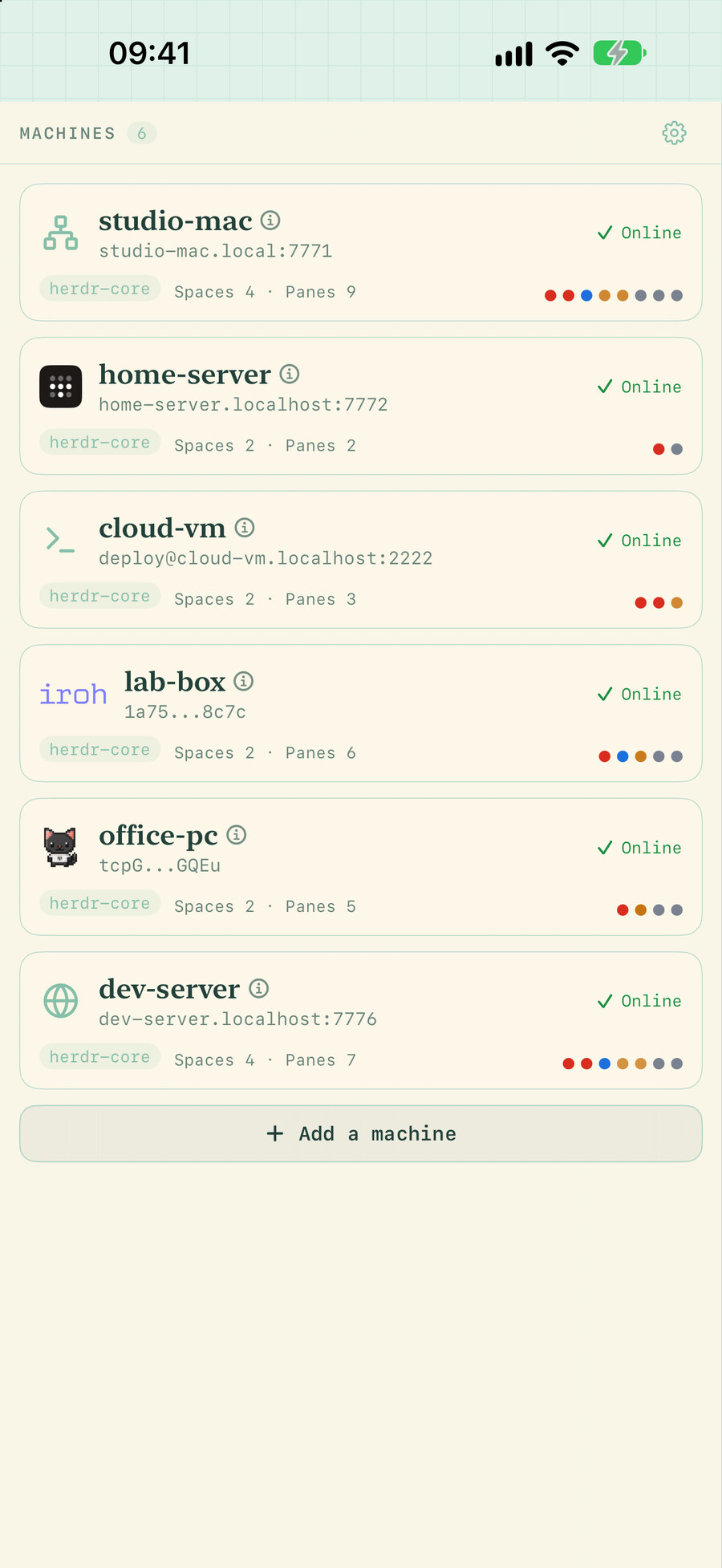
Dogr on an iPhone: a list of computers and their connection states

Made for Herdr

A phone for the agents Herdr keeps running.

Herdr keeps your coding agents running in terminals on your computer. Dogr is the app that stays in touch with them when you are away from the desk.

Works with both

Dogr connects to Herdr TUI and to herdr-core. Pick the one you use when you add a computer.

The same words

Needs you, working, done, idle. Spaces and panes. Dogr reads the same theme files as the Herdr desktop app, so it can look like home.

Independent

Dogr is not made by the Herdr team. It is a fan’s project, built because Herdr is worth having in your pocket. Get Herdr at herdr.dev.

Experience

How it feels comes first.

The first rule of Dogr is how it feels. Every choice below is there because it saves you a tap, a wait, or a moment of “where was I?”.

Swipe, don’t dig.

Machines, spaces and the terminal are three panels side by side. One swipe moves between them, with your thumb. Close the app and open it tomorrow: it opens where you left it.

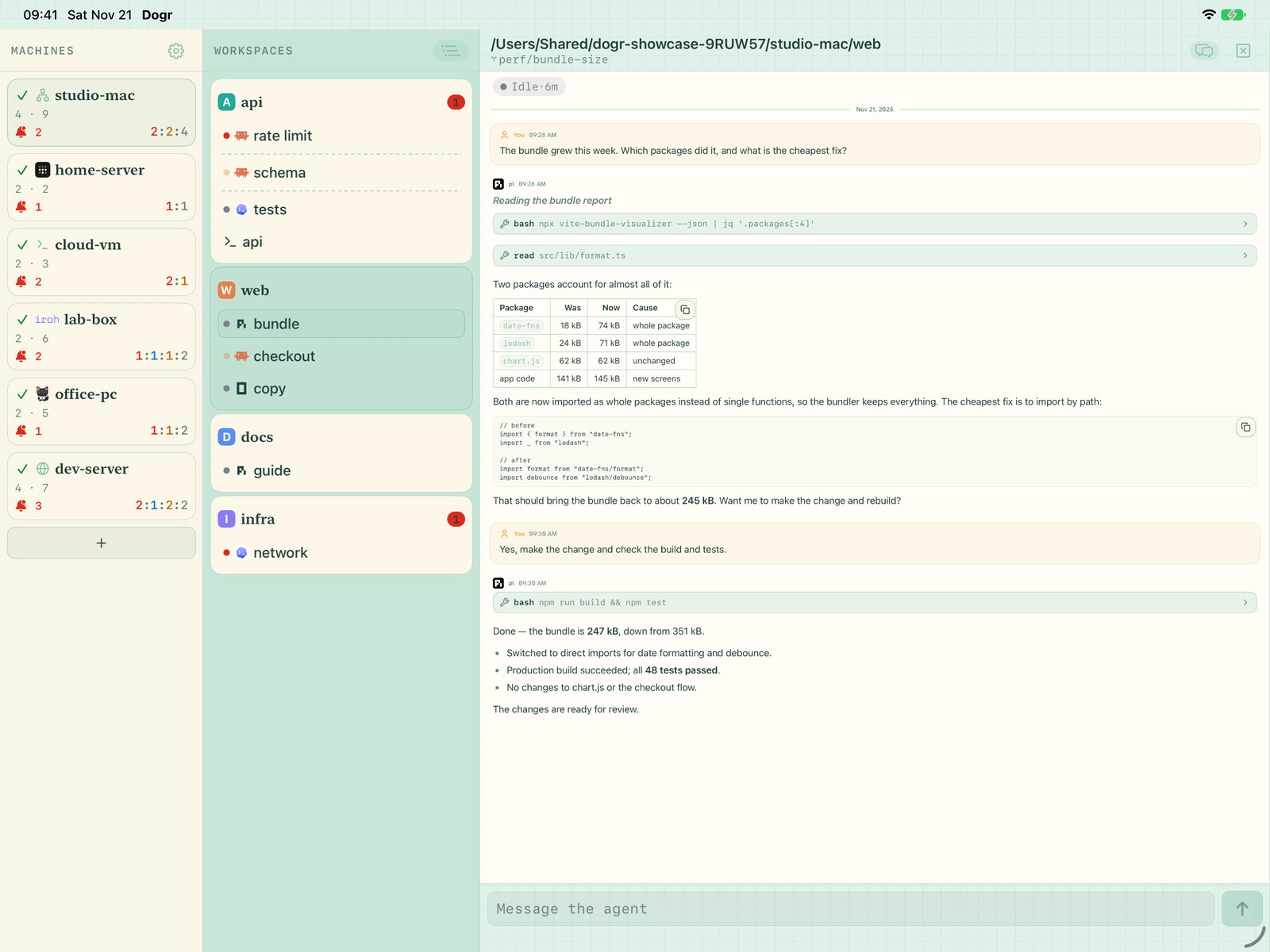
  • On iPad the panels stand next to each other.
  • In landscape you get all three at once.
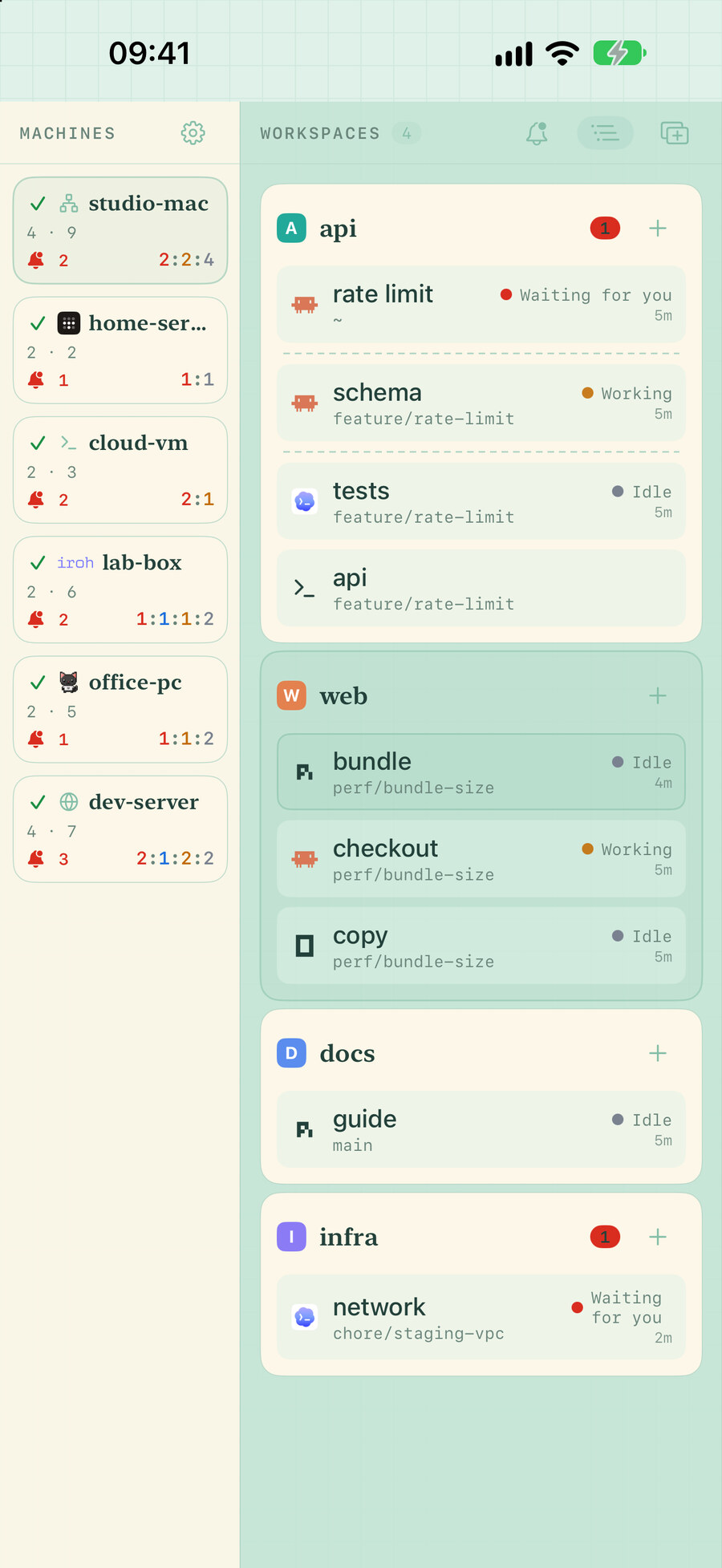
Dogr on an iPhone: the machines list and the workspaces of one machine, each agent with its state

Answer with a tap.

When an agent asks something (a permission, a choice, a step in a wizard) the question shows up as buttons. Tap the answer. No hunting for the right key.

When you do need keys, the bar is there: Esc, Tab, Ctrl and the arrows.

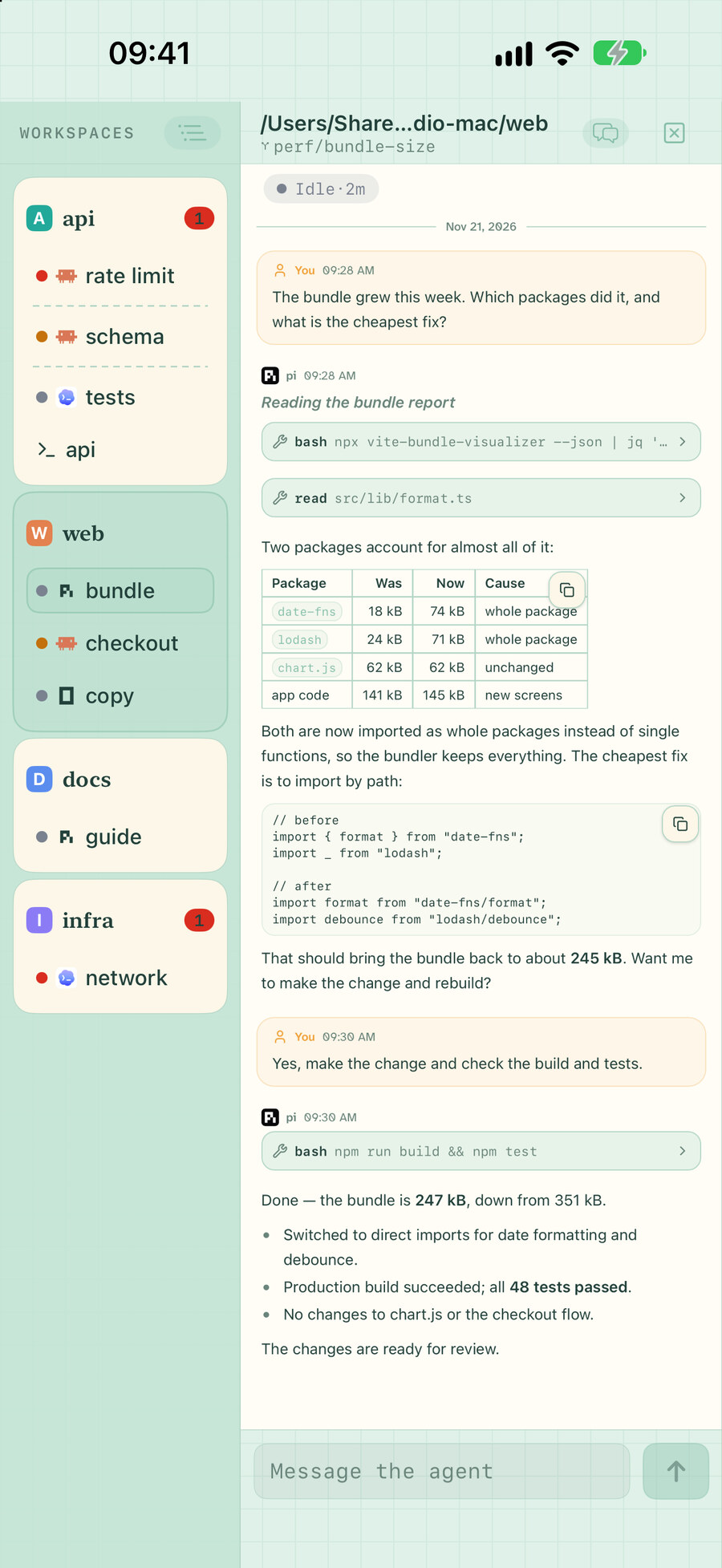
Dogr on an iPhone: the conversation view with a table, a code block and tool calls

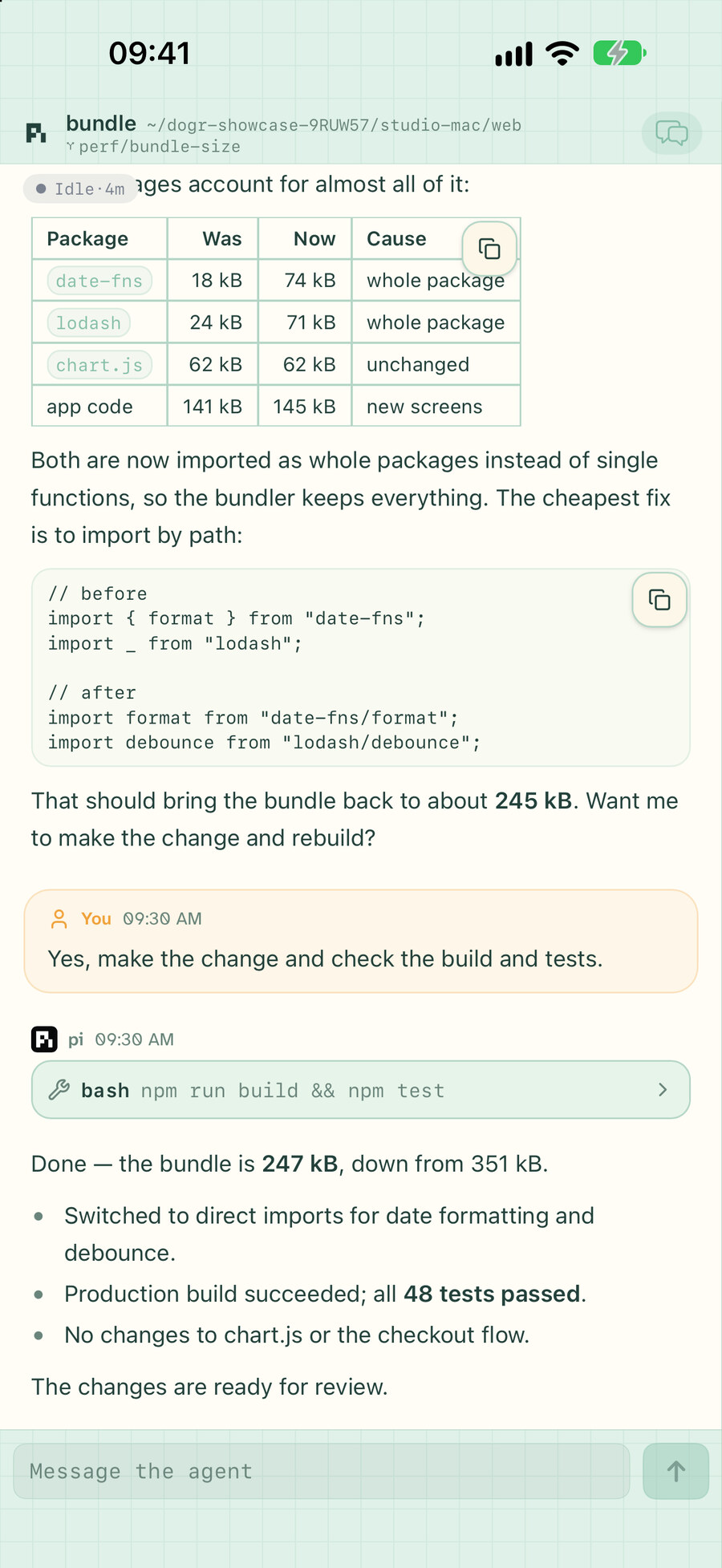
Read the conversation, not only the terminal.

A conversation view shows what the agent said and did: tables, code and tool calls, laid out to be read on a phone. Older messages load as you scroll up, and the conversation stays on your phone, so you pick up where you stopped.

Dogr on an iPhone: the conversation view with a table, a code block and tool calls

Calm when the network is not.

If the connection drops, Dogr keeps the last screen in front of you and tries again, slowly, instead of going blank and hammering the link. One loading mark per area, never a pile of spinners.

Yours to adjust.

  • 800+ built-in themes, every Ghostty theme included, plus the Herdr theme file format.
  • Text size from 80% to 140%.
  • iPhone and iPad, portrait and landscape.
  • 12 languages.
Dogr on an iPad in landscape: computers, workspaces and a conversation side by side

Connect

Reach your computer your way.

No account, no sign-in. Pick the route that fits your setup. One command on the computer sets it up and shows a QR code to scan. Or give the app an SSH login and it runs that command for you.

Tailscale

Already use it? Dogr connects over your tailnet.

Tailcat

No Tailscale? An encrypted link between your phone and your computer, no account.

Iroh

Another encrypted link over a different relay network, for when Tailcat can’t connect. You can run your own relay.

SSH

Already have SSH on the computer? Dogr signs in with a key it makes on the phone, or with your password, and forwards only the one port it needs. The key the setup command installs can do nothing else.

Your own proxy

Already put the computer behind an HTTPS reverse proxy? Point Dogr at its address.

Same Wi-Fi

At home, connect over the local network.

Honest note: on the same network it is fast. Away from home, a route that goes through a relay can be slower than you would like.

Compare

Dogr and Herdr’s own phone app.

Herdr has its own phone app, made by the Herdr team. It is a fine choice, and you can run both. Dogr is an independent alternative with a different focus. Here is how they differ.

Where Dogr goes further

 DogrHerdr’s phone app
Herdr TUIWorks, and herdr-core tooNot supported (“Herdr TUI isn’t supported”)
Oldest iOSiOS 17.5 and lateriOS 26 and later
Languages12English
How it reaches your computerTailscale, Tailcat, Iroh (your own relay allowed), SSH, your own HTTPS proxy, or the same Wi-Fi. An SSH server is needed only for the SSH route.SSH with a key made on the phone, or Tailscale SSH
Answering an agent’s questionQuestion cards: tap the choiceType in the real terminal, with a key bar
Reading what the agent didA conversation view with tables, code and tool callsNot listed
Conversation saved on the phoneYes, you pick up where you stoppedNot listed
On a weak connectionKeeps the last screen and retries more slowlyNot listed
Look800+ built-in themes (every Ghostty theme included), the Herdr theme file format, text size 80% to 140%Follows your Ghostty theme

Where Herdr’s app goes further

 DogrHerdr’s phone app
AndroidNot yet. iPhone and iPad firstYes
Windows computersmacOS and Linux onlyYes
Extra software on the computerA small Dogr service (one command installs it)Only herdr-core
One list for every machineOne machine at a time; the machine cards show a summaryAn inbox across all machines
Dictation and photosNot built in yetBuilt-in dictation, attach photos
Try it firstNo demo yetA demo with pretend machines
Who makes itAn independent projectHerdr, Inc., the makers of Herdr
On the App StoreNot yet: early versionYes, free

What is said about Herdr’s app comes from its own pages (herdr.dev/mobile and its App Store page), read on 15 November 2026. “Not listed” means those pages don’t mention it, not that it is missing. Something out of date? Tell me and I will fix it.

Get started

Three steps.

Herdr on your computer

Dogr needs Herdr (TUI or herdr-core) running on a Mac or Linux computer. Get it at herdr.dev.

One command

Run it in a terminal on that computer. It sets up what Dogr needs and shows a QR code.

Scan in the app

Open Dogr, add a computer, scan the code. Your agents appear.

curl -fsSL https://dogr.dev/setup.sh | sh

The script says what it is about to do and asks once before it changes anything. You can read it first; options and how to undo everything are in the README. The app also shows the exact command for the route you pick.

The Dogr dog

I love Herdr. It changed how I work with coding agents.

What I wanted most was a way to look after them from my phone that feels as good as Herdr does on the computer. Dogr is my try at that.

It is new, and there is a lot left to polish. For now I am putting everything into making it feel right on iPhone and iPad; other platforms can wait until the features and the way it behaves have settled. The best way to make it better is to hear from you.

Feedback

Dogr is new. Tell me what’s wrong.

If something annoys you, confuses you or is missing, I want to know. Small things count. Rough edges are exactly what I am hunting.

In the app

Settings, then Send feedback. It opens a mail with a small file of basic facts and the recent log. Names, addresses and pairing codes are left out. You can read both before you send.

By email

fb@dogr.dev. A sentence is enough.

On GitHub

My profile: github.com/mithyer. You can find me there too.

On Discord

Join the group: discord.gg/dprTGeM7U. Ask, chat, tell me what breaks.

QR code that joins the Discord group

On Telegram

Join the group: t.me/herdogr. Ask, chat, tell me what breaks.

QR code that joins the Telegram group

What I am working on next: notifications for when an agent needs you or has finished. No date yet.

Get Dogr for iPhone and iPad.

Dogr is on the App Store. It is an early version, and I am still polishing it.

Download on the App Store
QR code that opens Dogr in the App Store
Scan with your iPhone